GridFace Ultimate User Guide
Welcome to GridFace! This is a highly customizable, fully touch-enabled professional sports watch face. To help you unlock its full potential, please read the following guide carefully.
🎨 1. How to Successfully Customize Colors (Must Read!)
Many users report that after entering color codes, the watch face colors don't change. This is because you must activate the custom mode first!
Correct Steps:
- Open the Garmin Connect IQ app on your phone and enter the GridFace settings.
- Find the "Color Style" option.
- CRITICAL STEP: In the dropdown list, scroll to the very bottom and you must select either
100. Custom Dual-Coloror101. Custom Multi-Color. - Once the mode is selected, enter your 6-character Hex color codes (e.g.,
FF0000) into the corresponding color fields below. - Click "Save" to sync to your watch. The colors will now take effect!
👆 2. Hidden Interactions: Seamless Lunar & Moon Phase Toggle
GridFace supports full-screen touch (on touchscreen-enabled devices). Tapping an icon on the watch face will automatically launch the corresponding widget on your watch (e.g., tapping Heart Rate opens the HR graph).
🌟 Exclusive Hidden Interaction (Date Area):
- If you set any data slot to "DATE_WEEK":
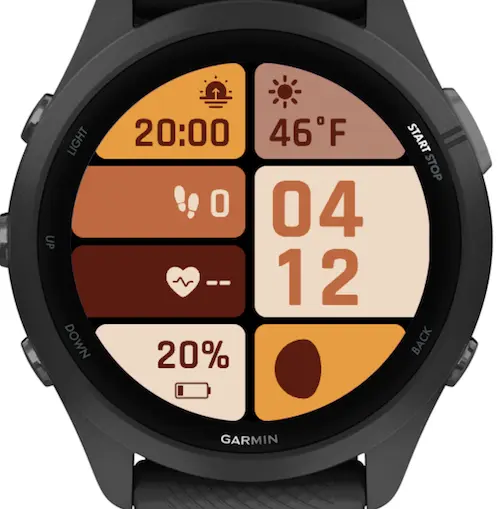
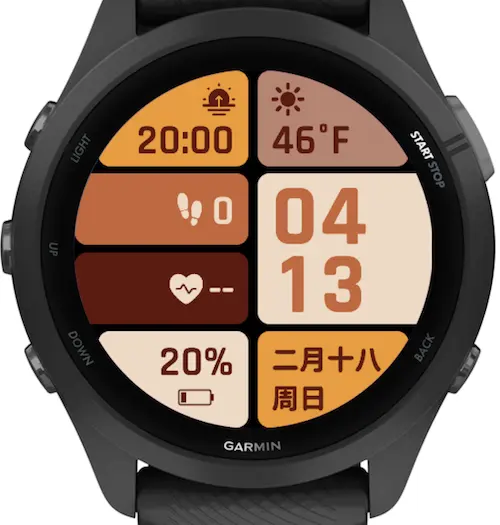
- Tap directly on that data area to instantly toggle between the "Standard Date", "Lunar Calendar (Traditional Chinese)", and "Moon Phase (8 different phase icons)"!
- Note: The Lunar Calendar text will only display if your watch language is set to Chinese. On non-Chinese systems, tapping will toggle directly to the Moon Phase icons.
📊 3. Core Data Fields Explained
We've packed dozens of professional data sources into GridFace. Here are details on some of our standout metrics:
- 🔥 Active Min (Intensity Minutes): Based on massive user feedback, the logic is now optimized to prioritize your "Total Weekly Intensity Minutes" to better track your weekly fitness goals (if your device doesn't support weekly tracking, it falls back to daily minutes).
- 🔋 Battery Display Style: In settings, you can choose the traditional "Percentage (%)" or switch to "Days (d)" (requires device support for battery life estimation).
- 🏃♂️ Segmented Distance: Designed for triathletes and cross-trainers. Supports individual display of: Day/Week/Month Running Distance, Cycling Distance, and Swimming Distance.
- ☀️ Next Sun Event: The "Next Sun" field is smart. It evaluates the current time and intelligently displays either the upcoming sunset today or the next sunrise tomorrow.
- 🧘 Advanced Physiological Metrics: Perfect support for Body Battery, Stress Score, Recovery Time, VO2Max, and Training Status.
☁️ 4. Weather Provider Guide
GridFace offers three Weather Providers. You can switch between them in the settings:
- Yr.no (Recommended): Free, global coverage, no registration required. Highly recommended for most users.
- Garmin System: Uses the official weather synced from your phone. Most battery-efficient.
- Visual Crossing: Designed for power users. Extremely accurate, but requires you to register on their website for an API Key and enter it into the watch face settings.
📮 5. Support & After-Sales
Didn't receive the PRO Code email? Please check your Spam / Junk folder first — the activation email and the Stripe receipt are sometimes filtered there by mistake. If it still hasn't arrived after a few minutes, contact us with your Watch Face ID and we'll sort it out.
Get in touch:
- Email: docwei2050@gmail.com
- Xiaohongshu / RED:
yuan8wan(for users in China)
🎨 6. Theme Color Hex Codes
AMOLED Dual-Color Themes
💡 Tip: You must select
100. Custom Dual-Colorin settings for these to take effect.
| ID | Theme Name | Main Color (Bg) | Sub Color (Fg) |
|---|---|---|---|
| 0 | Military Green | #4A5D4E | #F4F1E1 |
| 1 | Burgundy Red | #990033 | #DDCDB7 |
| 2 | Mint Green | #7CFFDE | #2E2E2E |
| 3 | Romantic Purple | #652C97 | #FFDBDD |
| 4 | Klein Blue | #002FA7 | #FFCF14 |
| 5 | Pale Blue | #0E455C | #FDC41F |
| 6 | Brick Red | #BD4726 | #BBF0EA |
| 7 | Indigo Blue | #28517F | #C7E1FA |
| 8 | Rust Red | #B3503D | #F5F4ED |
| 9 | Lake Green | #029D94 | #EEEEEE |
| 10 | Dark Green | #235F5C | #D9CDCE |
| 11 | Polar Night Black | #222222 | #CCCCCC |
🌈 AMOLED Multi-Color Themes
💡 Tip: You must select
101. Custom Multi-Colorin settings. Format:Background / Foreground.
| ID | Theme Name | TopLeft(TL) | MidLeft1(ML1) | MidLeft2(ML2) | BotLeft(BL) | TopRight(TR) | MidRight(MR)* | BotRight(BR) |
|---|---|---|---|---|---|---|---|---|
| 30 | Dunhuang | #56271E#EBD7B6 | #B7824E#070D10 | #569692#FFFFFF | #070D10#569692 | #EBD7B6#56271E | #569692#070D10 | #56271E#B7824E |
| 31 | Morandi | #3A4E59#D8CEC5 | #606551#D8CEC5 | #9FACA1#3A4E59 | #B69664#3A4E59 | #D8CEC5#3A4E59 | #3A4E59#B69664 | #9FACA1#3A4E59 |
| 32 | Maillard | #E49E44#5B1D14 | #BE6B47#E8D9C5 | #5B1D14#E8D9C5 | #E8D9C5#5B1D14 | #B08575#5B1D14 | #E8D9C5#BE6B47 | #E49E44#5B1D14 |
| 33 | Matcha Latte | #609966#EDF1D6 | #EDF1D6#40513B | #9DC08B#FFFFFF | #40513B#EDF1D6 | #EDF1D6#609966 | #40513B#EDF1D6 | #9DC08B#40513B |
| 34 | Vintage Wood | #76453B#F8FAE5 | #B19470#76453B | #43766C#F8FAE5 | #F8FAE5#43766C | #43766C#F8FAE5 | #76453B#F8FAE5 | #F8FAE5#76453B |
*Note: The text (Foreground) color in the "Mid-Right (MR)" slot also applies to the large main digital clock.
⌚️ MIP Display Exclusive: Dual-Color (64-Color Palette)
💡 Hardcore Tip for Fenix / Forerunner users: If you have a watch with an MIP screen, entering the AMOLED hex codes above will automatically be quantized to the closest MIP-safe color. However, for a 100% pixel-perfect, anti-dithering display, use these hand-tuned 64-color safe palettes below!
| ID | Theme Name | Main Color (Bg) | Sub Color (Fg) |
|---|---|---|---|
| 0 | Military Green | #00AA00 | #FFFFFF |
| 1 | Burgundy Red | #AA0000 | #FFFFAA |
| 2 | Mint Green | #005555 | #55FFAA |
| 3 | Romantic Purple | #5500AA | #FFAAFF |
| 4 | Klein Blue | #0000FF | #FFFF00 |
| 5 | Pale Blue | #0055AA | #FFAA00 |
| 6 | Brick Red | #FF5500 | #AAFFFF |
| 7 | Indigo Blue | #0055AA | #AAFFFF |
| 8 | Rust Red | #AA5500 | #FFFFFF |
| 9 | Lake Green | #00AAAA | #FFFFFF |
| 10 | Dark Green | #005555 | #FFAAAA |
| 11 | Polar Night Black | #555555 | #FFFFFF |
⌚️ MIP Display Exclusive: Multi-Color (64-Color Palette)
| ID | Theme Name | TopLeft(TL) | MidLeft1(ML1) | MidLeft2(ML2) | BotLeft(BL) | TopRight(TR) | MidRight(MR)* | BotRight(BR) |
|---|---|---|---|---|---|---|---|---|
| 30 | Dunhuang | #AA5500#FFFFAA | #AA5500#000000 | #00AAAA#FFFFFF | #000000#00AAAA | #FFFFAA#AA0000 | #00AAAA#000000 | #AA0000#FFAA00 |
| 31 | Morandi | #555555#FFFFFF | #555555#FFFFAA | #AAAAAA#000000 | #AA5555#000000 | #FFFFAA#555555 | #555555#FFAA55 | #AAAAAA#000000 |
| 32 | Maillard | #FFAA00#550000 | #AA5500#FFFFAA | #550000#FFFFAA | #FFFFAA#550000 | #AA5555#000000 | #FFFFAA#AA5500 | #FFAA00#550000 |
| 33 | Matcha Latte | #00AA00#FFFFAA | #FFFFAA#005500 | #55AA55#FFFFAA | #005500#FFFFAA | #FFFFAA#00AA00 | #005500#FFFFAA | #55AA55#005500 |
| 34 | Vintage Wood | #AA5500#FFFFAA | #AA5555#000000 | #00AA55#FFFFFF | #FFFFAA#005555 | #005555#FFFFAA | #AA5500#FFFFFF | #FFFFAA#AA5500 |